Reigning in SQL Server’s query optimizer #
Like most modern relational database management systems, SQL Server has a built in query optimiser. This query optimiser takes an incoming query, its parameters, the state of the database at the time and returns a plan of execution.
Essentially: #
optimiser = f(query, parameters, db_state) → query_plan #
This is great! In most cases, the query plan that the DBMS would return is an efficient one. To make things less resource-intensive, rather than run the optimiser every time, SQL Server will cache results of the query plan in something called a query-plan-cache.
Assume your db_state does not change frequently, like if you have a low write-read ratio. If your query runs against the same db_state, the optimiser gets the query plan right every time. However, as we learnt, sometimes, the cached query plan backfires even if db_state remains the same.
This is because the parameters are only taken into account when optimising the query. The cache is not built against the parameters because, that would increase the size of the cache. If you have a setup where there is an unequal distribution of data for some of the parameters, things might go wrong.
Here’s what happened:
We have a few reporting queries that return a list of orders for an organisation. These queries are fairly innocuous. Something to the tune of:
If you were looking at the cost for this and for its plan, you’d find that they are really, really low. Yet, what we saw was this.
SELECT * from orders WHERE buyer = ? or seller = ? ... *other filters...*
These queries (high volume) started timing out. When I say timing out, every single one of them was timing out. A query, which has a very low cost was consistently timing out. If you started diagnosing this, you’d think the database was acting up. And you’d be right. But why? We have the largest database money can buy (probably), and this 128 vCore mammoth was struggling to run indexed queries on a single table? That could not be right.
We looked at the db-admin views and realised that these queries were taking up significant CPU. But again, why?
Once we looked at the query plan cache, things became clearer. Here’s what was happening:
- We have some organisations which have an atypical spread of orders. eg. Grantrail, Stacktrail etc. The number of orders for these are 40-50 times compared to our median sellers.
- If, when the query plan cache was getting populated, one of these sellers was used as a parameter, the optimiser function would (correctly) identify that a very large number of rows would need to be scanned to apply the filters.
- It would create a separate query plan. Store that in the cache.
- As it happened, this query plan, was more performant, but only if the seller was one of these atypical ones. For the typical seller, this was many ~50 times more resource-intensive.
- The query plan, because it was cached, would be reused for other parameters, leading to a very high resource utilisation and eventual slow down of the query responses. To the point where there would be consistent time outs.
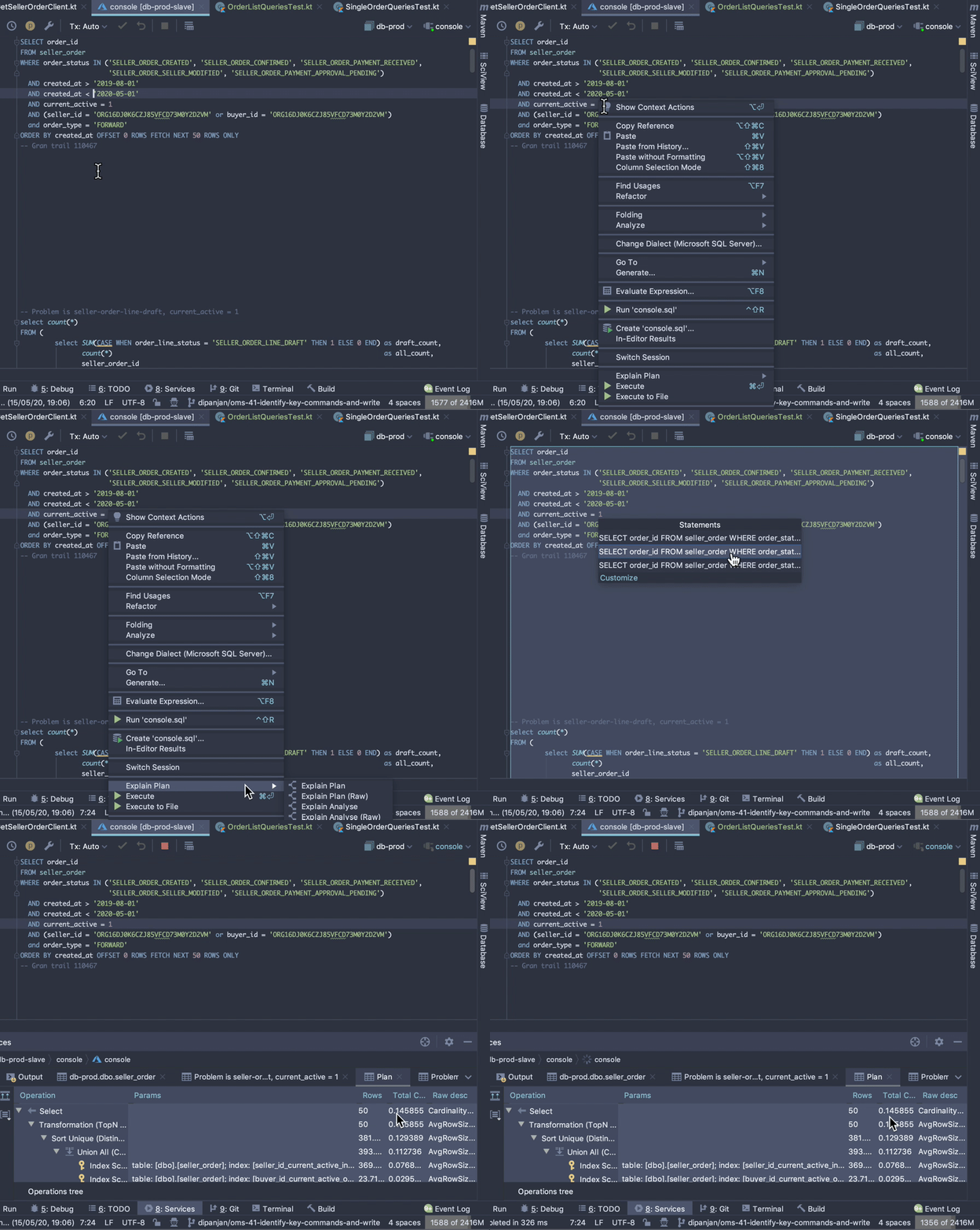
Open the toggle below to see how to view query cost in IntelliJ
-
How to view query cost in IntelliJ
Solution #1: Imperius Paradigmus #
Once we realised that the query plan cache was causing troubles, we added something called an index hint. An index hint tells the optimiser that we know better. It instructs the usage of a specific index.
This did what we intended. It ensured the resource intensive plan was never used. This penalty in performance is acceptable when the parameters causing the skew are rare. eg. In our case, these queries are rarely made for Grantrail and other high volume sellers.
However, this is a knee jerk-reaction and over-optimises for the problem. You’ve got to realise how brilliant SQL is.
SQL is declarative. It is not imperative. It does not tell the database engine how to run the query. It merely declares what the result should be. This is what enables the same SQL standard to work well across myriad relational-database systems, storage engines and in some cases, like cosmos, non-relational databases.
By giving the index hint, we were venturing into imperative territory. If at some point in the future, the index hinted query would not be the optimal path for majority of our sellers, it would still use the index and hurt us slowly.
Solution #2: Declaratus Paradigmus #
To step back into declarative territory, we needed to figure out what was causing the engine to use the resource-intensive path for the Grantrail case.
When SQL optimizer attempts to solve a query, by identifying a query plan, it uses various heuristics to figure out the optimal plan. For eg. one plan might result in low setup time where the first pages can start streaming quickly, while another plan can result in low overall time.
To tune the optimizer and specify what your goals are, you can use the OPTION sql keyword. In our case, turning off the ROWGOAL optimizer worked out. The ROWGOAL is a heuristic which tries to keep the total number of rows being considered as candidates to the query minimal.
OPTION(USE HINT ('DISABLE_OPTIMIZER_ROWGOAL'))
In our case, it turned out, SQL Server, in trying to optimize for row-goals, was creating the resource-intensive query plan for Grantrail.
Adding this hint allowed the queries for the common non-grantrail cases to be blazing fast without specifically recommending an index which might be construed as imperative.
How do I know if some of my queries could have a similar issue? #
So, how would you know if this issue could plague you as well? After all, we all might have some entities in our schema which end up taking the lions share of sub-entities. If you believe some of your queries could be affected, try to look at the difference in the p95 and p99 performance of those queries.
A significant delta could tell you that certain queries always take time. Given that in our ADX setup, the actual SQL query parameters are also logged, you could end up figuring out the problematic entity ids from ADX directly!
Eg. You can use the following ADX query to get a list of DAO methods in order-mgt-svc along with their 95th and 99th percentile summaries over the last day. You can then use it to figure out which DAO methods are potentially facing a skew.
HttpRequests
| where Method == "sql"
| where Container == "order-mgt-svc"
| where Timestamp > ago(24h)
| summarize percentile(Duration, 99), percentile(Duration, 95) by tostring(Properties.loc)
| take 10
| render barchart